Email is still the most common way businesses get attacked, not through some exotic zero-day, but through a message that looks legit and isn’t: a fake invoice, a “CEO” asking for a wire transfer, a link that leads nowhere good.
A Comodo S/MIME certificate deals with a specific slice of that problem. It proves who actually sent an email and encrypts the contents so only the right person can read them.
Here’s what one does, how the encryption actually works, and how to pick one without overpaying.
What is a Comodo S/MIME Certificate?
S/MIME (Secure/Multipurpose Internet Mail Extensions) is a certificate-based standard for signing and encrypting email, and it’s been around since the mid-1990s. A Comodo S/MIME certificate is issued through Sectigo, the CA that now runs the legacy Comodo brand. It binds a verified identity, a person or an organization, to a public/private key pair.
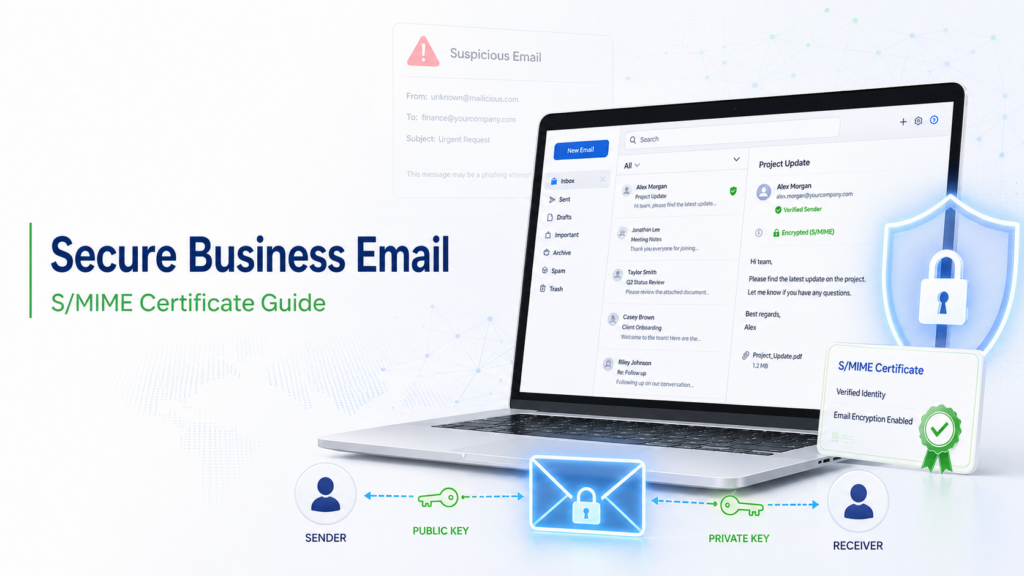
Install it in an email client, and two things start happening on their own. Outgoing messages get signed, so recipients can verify who sent them and confirm nothing changed in transit. Message content gets encrypted too, so only whoever holds the matching private key can actually read it.
It isn’t the same job as DMARC or SPF. Those protect your domain’s reputation at the server level. S/MIME protects the message itself, which is why most security-conscious teams run both rather than picking one.
How S/MIME Email Encryption Works
S/MIME relies on asymmetric encryption: a public key and a private key.
- Your certificate carries a public key. You share it, usually without thinking about it, through your signed emails.
- Anyone sending you an encrypted message uses that public key to lock it.
- Only your private key, sitting on your device, can unlock it.
Signing runs the same process in reverse. Your private key signs the message you send, and the recipient’s client uses your public key, attached right there in the email, to confirm it’s really from you and that nothing changed along the way.
Outlook, Apple Mail, and Thunderbird: all three support S/MIME out of the box. Once the certificate’s installed, signing and encryption happen—no extra clicks for the person hitting send.
Benefits of Using an S/MIME Certificate
A signed email cryptographically proves who sent it, so a spoofed “from” address stops working as well as it used to. Encryption keeps the actual content, contracts, financial details, or internal threads unreadable to anyone who intercepts it along the way. Signed messages also show up with a verified badge in supporting clients, which reassures whoever’s reading them that it’s the real thing.
There’s a compliance angle too, though it’s easy to overstate. Industries handling financial, legal, or health data usually need some form of documented encryption control, and S/MIME gives them one that’s auditable. And internally? A fake email “from” the CFO gets a lot less convincing once signed messages are just the norm.
Who Should Use S/MIME Certificates?
S/MIME makes the most sense for people who are actual targets, not just anyone with an inbox. Finance teams and executives take the brunt of wire fraud and invoice-redirect scams. Law firms and healthcare practices have client confidentiality built into how they’re regulated. MSPs managing a stack of client domains would rather standardize a rollout once than firefight it domain by domain.
Almost any business exchanging contracts, credentials, or financial data over email should be on this list, which includes most businesses. The assumption that S/MIME is “enterprise-only” doesn’t really hold anymore. Certificate pricing and client-side setup are simple enough now that a small team can deploy it per mailbox without hiring dedicated PKI staff.
Comodo vs Other S/MIME Providers
Comodo (Sectigo)-issued S/MIME certificates compete mostly with DigiCert and GlobalSign. The cryptography underneath is standardized across all three, so the real differences aren’t about security strength. They’re about price and support.
Sectigo tends to be priced lower than DigiCert, and that gap adds up fast once you’re issuing certificates across a whole team or client base. Validation speed for email-only certificates is fast almost everywhere; organization-validated S/MIME goes through the same basic checks no matter which CA you pick. Sectigo certificates also get resold so widely that going through a specialized reseller instead of buying directly often gets you a better deal and faster support.
For most SMBs and MSPs, brand isn’t really the deciding factor. Budget fit for a team-wide rollout is. So is whether support actually responds when a certificate needs reissuing.
How to Install an S/MIME Certificate
The general process looks about the same across clients:
1. Purchase the certificate and complete identity validation, either email-only or organization-level, depending on the type.
2. Download the issued certificate: a .p12/.pfx file holding your public and private keys.
3. Import it into your mail client. In Outlook, that’s under Trust Center > Email Security. Apple Mail and Thunderbird do the same thing, just buried under different menus.
4. Turn on signing and encryption. Set your client to sign everything outgoing by default, and encrypt whenever the recipient’s public key is available.
5. Back up the private key somewhere safe. Lose it, and you lose access to anything you’d previously encrypted.
For a whole team, this usually gets scripted or handled centrally by IT or an MSP. Nobody wants to walk fifteen people through it one at a time.
Choosing a Cheap S/MIME Certificate Without Sacrificing Security
Cheap and low-quality aren’t the same thing here. S/MIME cryptography is standardized, so a lower-priced certificate from a reputable CA gives you the same encryption strength as a premium one. What actually varies is everything around the certificate itself.
Start with validation level: email-only works for individual signing, organization-validated makes more sense once sensitive data’s involved. Reissuing a lost or compromised certificate shouldn’t cost extra or take days, so it’s worth asking about that up front rather than finding out the hard way. And multi-year or multi-seat pricing is usually where the real savings show up once you’re covering a whole team, so ask for a quote instead of assuming per-seat pricing is fixed.
One more thing worth checking: does the provider actually send renewal reminders? An expired S/MIME certificate fails quietly. Most people don’t notice until someone’s email stops working.
Frequently Asked Questions
Is a Comodo S/MIME certificate the same as an SSL certificate?
No. SSL/TLS secures website traffic, while S/MIME secures individual email messages. They’re related concepts built on the same PKI foundation, but they solve different problems.
Can I use S/MIME and DMARC together?
Yes, and most security-conscious teams do exactly that. DMARC protects your domain’s reputation at the server level, while S/MIME protects individual messages and mailboxes. Different layers, working toward the same goal: making sure the email people receive can actually be trusted.
Does S/MIME work on mobile email apps?
Generally, yes. Native mail apps on iOS and Android support S/MIME once the certificate’s installed on the device or synced through the mail profile.
What happens if my S/MIME certificate expires?
Signing and decryption of new mail stop working under that identity, and older encrypted mail can become unreadable too if you don’t hang onto the expired private key.
Conclusion & CTA
A Comodo S/MIME certificate doesn’t get as much attention as SSL or DMARC. Still, it closes a real gap around email impersonation and unprotected sensitive content, without needing an enterprise budget to deploy. If you’re comparing options, look for validated CA-backed certificates at reseller pricing rather than paying enterprise list rates for the same underlying cryptography.
Browse Comodo/Sectigo S/MIME certificate options and team pricing at SSLCertShop when you’re ready to roll this out.